
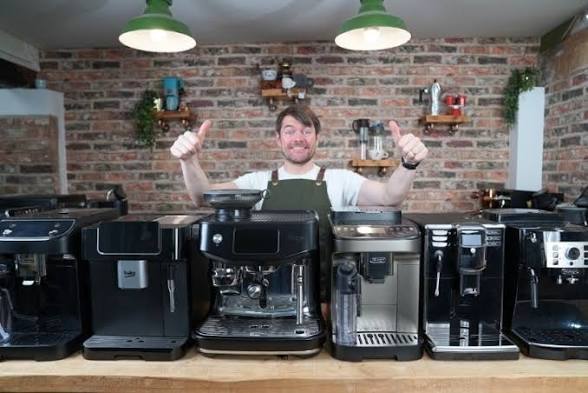
Bean to Cup Coffee Makers with Touchscreen vs Button Controls: Which Is Easier for Self-Service?
If you’ve ever walked into a modern office kitchen or a busy cafe and stood in front of a gleaming coffee machine wondering which button actually makes a flat white, you’re not alone. The debate around touchscreen vs button controls on bean to cup coffee makers has become increasingly relevant as more businesses and homes invest in premium coffee solutions. And the question isn’t just about aesthetics — it’s about ease of use, reliability, and how quickly someone unfamiliar with the machine can get a great cup without calling for help.
Let’s break it down properly, because the right choice really does depend on how and where the machine is being used.
The Rise of Self-Service Coffee in Workplaces and Hospitality
Self-service coffee has completely changed the way people experience their daily brew. Instead of waiting in a queue or relying on a dedicated barista, users simply walk up to the machine, make a selection, and walk away with a freshly ground cup in hand. This shift has made the control interface one of the most important features to consider when choosing a machine.
In high-footfall environments like offices, hotel lobbies, or co-working spaces, the machine needs to be intuitive enough for first-time users while still offering enough variety to satisfy regular coffee drinkers. That’s where the choice between touchscreen and button controls really starts to matter.
Touchscreen Controls: Sleek, Visual, and Surprisingly Intuitive
Modern touchscreens on bean to cup coffee makers UK models have come a long way. Gone are the days of laggy, unresponsive displays. Today’s touchscreen machines offer crisp visuals, illustrated drink menus, and guided steps that make ordering coffee feel almost like using a smartphone.
The biggest advantages of touchscreen controls include:
1. Visual drink guides : Instead of guessing what “programme 3” means, users see an image of a cappuccino or an Americano and tap directly on what they want. This alone significantly reduces hesitation and errors in self-service settings.
2. Customisation options : Touchscreens make it easy to offer users adjustable strength, temperature, and milk preferences without cluttering the interface with dozens of physical buttons. Everything is layered neatly behind a clean home screen.
3. Easy menu updates : For businesses, this is huge. If you want to add or remove a drink option, it’s a software update rather than a hardware change.
4. Modern aesthetic : Let’s be honest, a sleek touchscreen machine looks impressive. For client-facing spaces, that first impression counts.
However, touchscreens aren’t without their drawbacks. In environments with high humidity or where users might have wet hands (think gyms or kitchens), touchscreens can become unresponsive. They can also feel overwhelming to older users or anyone not comfortable with touchscreen technology. And if the screen malfunctions, the entire interface is compromised.
Button Controls: Simple, Reliable, and Universally Accessible
There’s something wonderfully straightforward about a well-labelled button. Press it, get your coffee. No menus to navigate, no swiping, no accidental taps.
At Coffee Seller, button-based automatic bean to cup coffee makers remain popular across a wide range of commercial settings, and for good reason. They tend to be more durable over time since there are fewer electronic components that can fail. They’re also easier to clean around and generally more accessible to a wider audience.
Key strengths of button controls:
1. Reliability : Physical buttons are robust. They work in all conditions, are easy to clean, and rarely experience the kind of technical glitches that touchscreens occasionally do.
2. Speed : For regular users who know which button is which, button machines can actually be faster. There’s no loading screen, no navigation — just press and go.
3. Accessibility : Users with visual impairments or limited dexterity may find clearly labelled tactile buttons much easier to use than a flat touchscreen.
4. Lower maintenance : Fewer digital components typically means fewer things to go wrong, which can reduce long-term servicing costs.
The downside? Buttons can look cluttered if there are too many options, and labelling sometimes becomes unclear as icons fade over time. For venues offering a wide variety of drinks, button-only interfaces can struggle to keep things simple.
So, Which Is Actually Easier for Self-Service?
Honestly, it depends on your environment and your users. Here’s a quick way to think about it:
Choose touchscreen if: You’re running a modern office, hotel, or hospitality venue where users are comfortable with digital interfaces, you want to offer a wide range of customisable drinks, and the aesthetic of the machine matters to your brand image.
Choose buttons if: You need something ultra-reliable in a busy, high-use environment, your users span a wide age range or technical ability, or you want minimal downtime and straightforward maintenance.
For many businesses investing in the best bean to cup coffee makers, the sweet spot lies in hybrid models machines that combine a simple touchscreen interface with a few physical shortcut buttons for the most popular drinks. This gives you the best of both worlds: visual appeal and intuitive navigation without completely abandoning the tactile reliability of physical controls.
What to Look for Beyond the Interface
Whether you go touchscreen or button, there are a few non-negotiables worth keeping in mind for any self-service setting:
1. Cleaning indicators : A machine that clearly signals when it needs cleaning will stay hygienic and extend its lifespan.
2. Cup size sensors : Machines that detect cup size avoid messy overfills, which is essential in self-service setups.
3. Bean hopper capacity : Larger hoppers mean fewer refills, which reduces the chance of someone being left without coffee mid-rush.
4. Water filter systems : Particularly important in the UK where water hardness varies significantly by region.
Find Your Perfect Machine at Coffee Seller: Your Trusted Source for Quality Coffee Solutions
When it comes to choosing the right bean to cup machine for your business or home, you don’t have to figure it out alone. Coffee Seller brings together an expertly curated range of commercial-grade coffee machines designed for real-world use. Whether you’re drawn to the modern appeal of a touchscreen or the dependable simplicity of button controls, there’s a machine in their collection that fits your needs, your space, and your budget. With a commitment to quality, great customer support, and a genuine passion for coffee, Coffee Seller is the kind of retailer that makes the buying process feel straightforward and even enjoyable. If you’re ready to upgrade your coffee experience, you’re in exactly the right place.
Frequently Asked Questions
Q1: Are touchscreen bean to cup coffee makers harder to maintain than button models?
Not necessarily. Both types require regular cleaning and descaling. However, touchscreen models may have more electronic components that could need servicing over time, whereas button-based machines tend to be mechanically simpler.
Q2: Can bean to cup coffee makers with touchscreens be used by people who aren’t tech-savvy?
Most modern touchscreen machines are designed with simplicity in mind, using intuitive icons and step-by-step guided prompts. That said, if your users are consistently unfamiliar with touchscreen technology, a button-based machine or a hybrid model might reduce friction and improve the overall self-service experience.
Q3: Which type of machine is better for a busy office environment?
For high-traffic offices, both can work well. Touchscreen machines are great for offering a varied menu with customisation, while button machines shine with their speed and durability. Hybrid machines, which combine both interfaces, are often the most practical solution for busy shared workspaces.
Q4: Do automatic bean to cup coffee makers produce better coffee than pod machines?
Generally, yes. Automatic bean to cup coffee makers grind fresh beans for every cup, which preserves the natural oils and flavour compounds that give coffee its depth and aroma. Pod machines are convenient but can’t match the freshness and quality that comes from grinding on demand.
Q5: Are bean to cup coffee makers suitable for small businesses?
Absolutely. There are excellent options at a range of price points designed specifically for small to medium businesses. The key is matching the machine’s output capacity to how many cups you’ll be serving per day, and choosing an interface that staff and visitors can use confidently without regular instruction.
Q6: How do I know which bean to cup machine is right for my venue?
Consider your daily coffee volume, the variety of drinks you want to offer, your users’ technical comfort level, and your budget for both the machine and ongoing maintenance. Speaking with a specialist retailer who stocks a wide range of commercial coffee machines is often the fastest way to narrow down the right choice for your specific situation.